StayTidy GM
Know your team is doing the job, without redoing it yourself.
Spot-check rooms from your phone. Turn anything that fails into a job for a named person, and it stays open until someone has checked it.
30 days free for the first 5 hotels · no card · no contract
From the walk to the handover
What a supervisor and a GM actually see. Screens from our demo hotel; the names and rooms are fictional.
Step 1
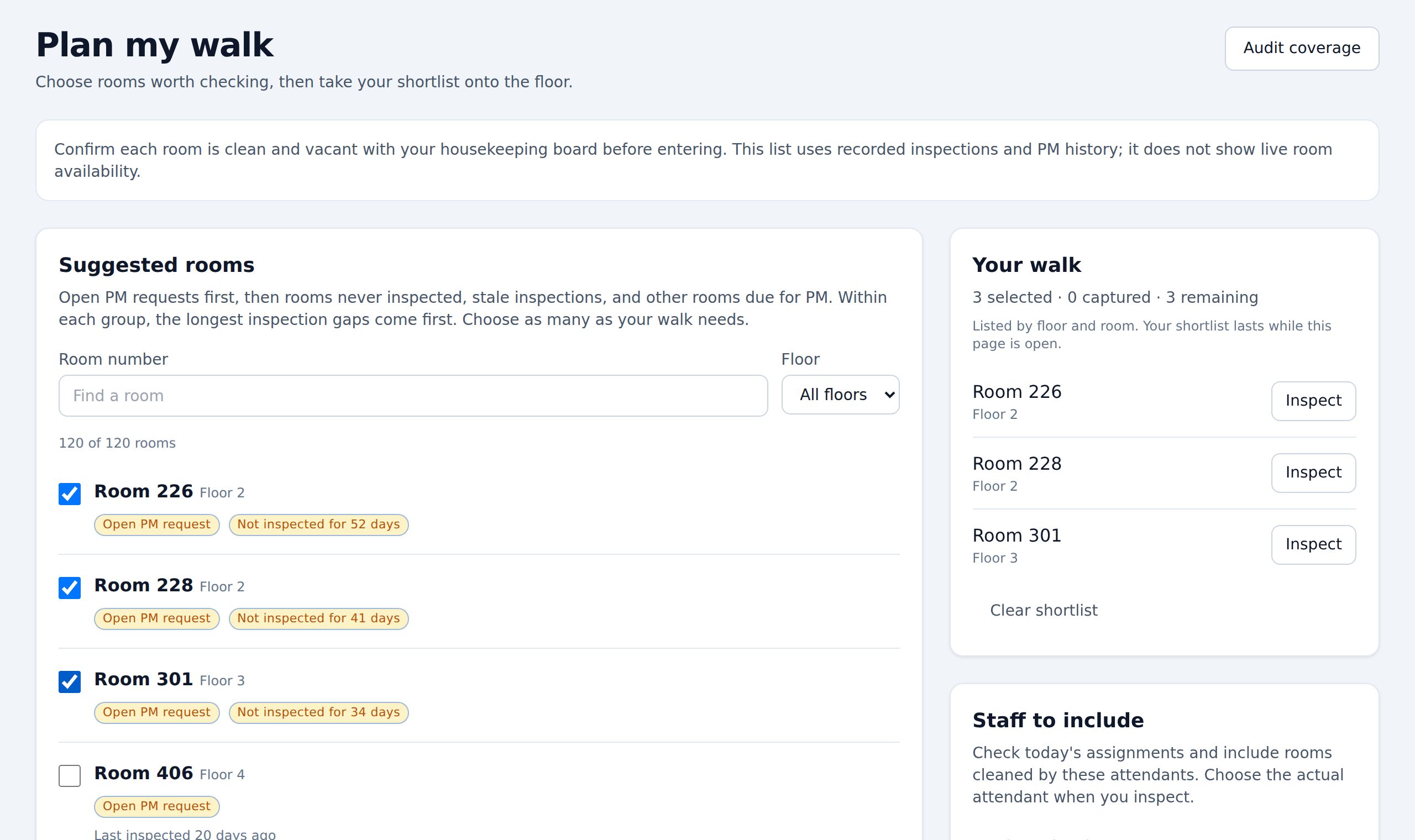
Plan the walk
StayTidy suggests rooms worth checking: open preventive-maintenance requests first, then rooms never inspected and the longest gaps. Tick a shortlist and take it onto the floor.
Step 2
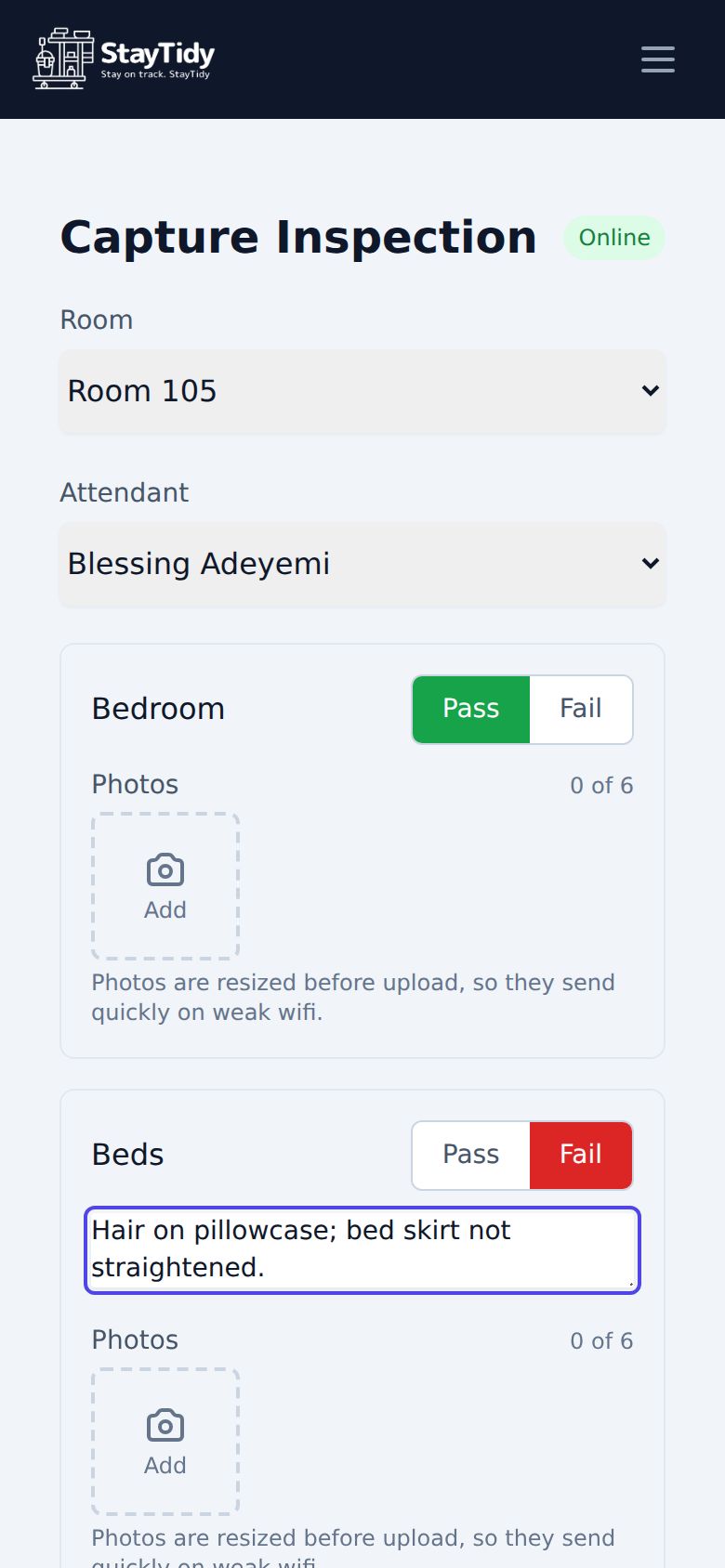
Inspect from a phone
Pass or fail each area with one tap, say what was wrong, add photos. Captured with no signal, it saves on the phone and sends when the connection returns.
Step 3
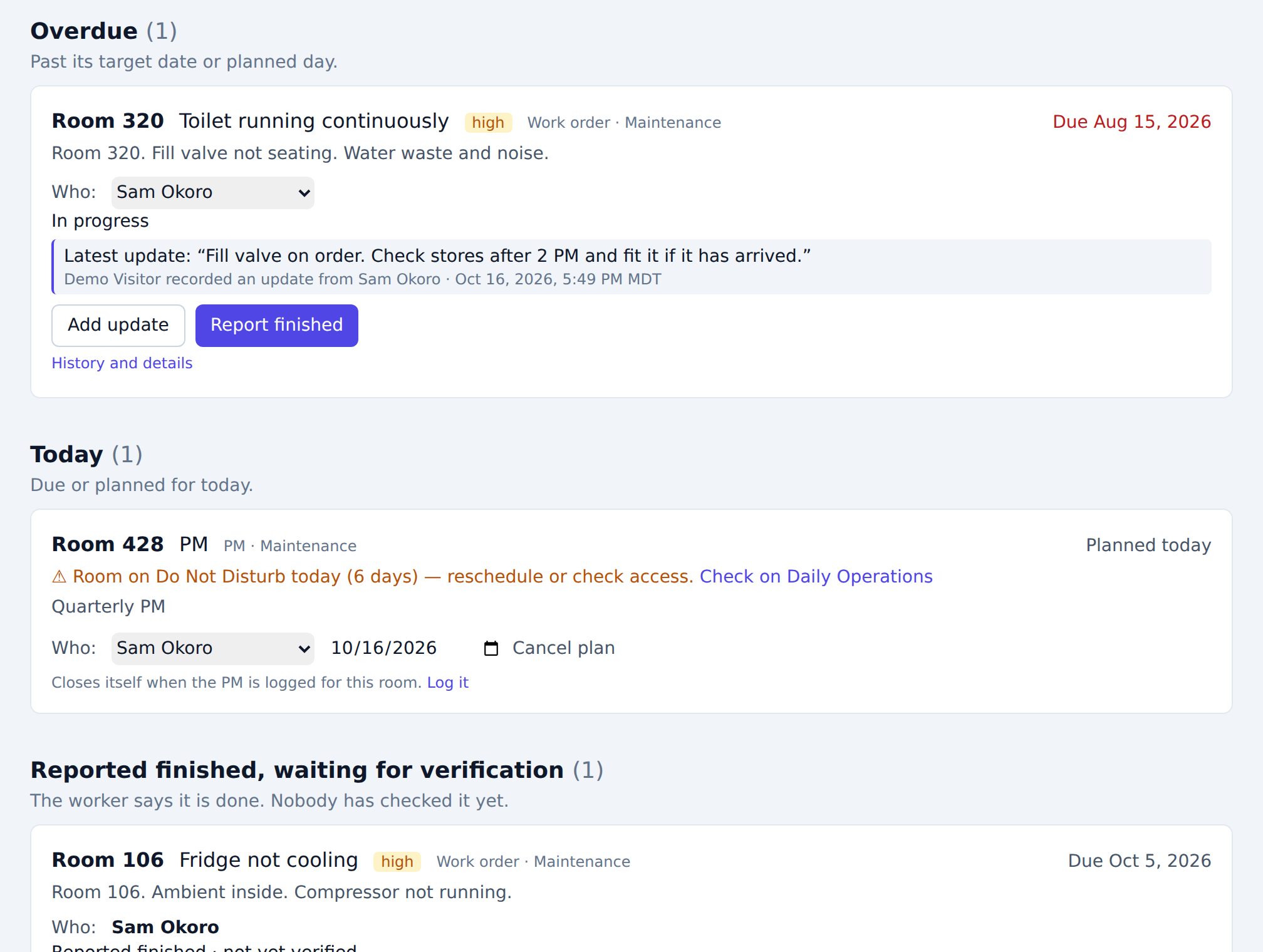
Hand it out, hand it over
From the inspection, turn a failed room into a re-clean or a failed area into a work order, and give it to a named person, with or without a login. The supervisor records what they report, and the next shift sees the latest updates, any rooms on Do Not Disturb, and what is still waiting to be checked.
Step 4
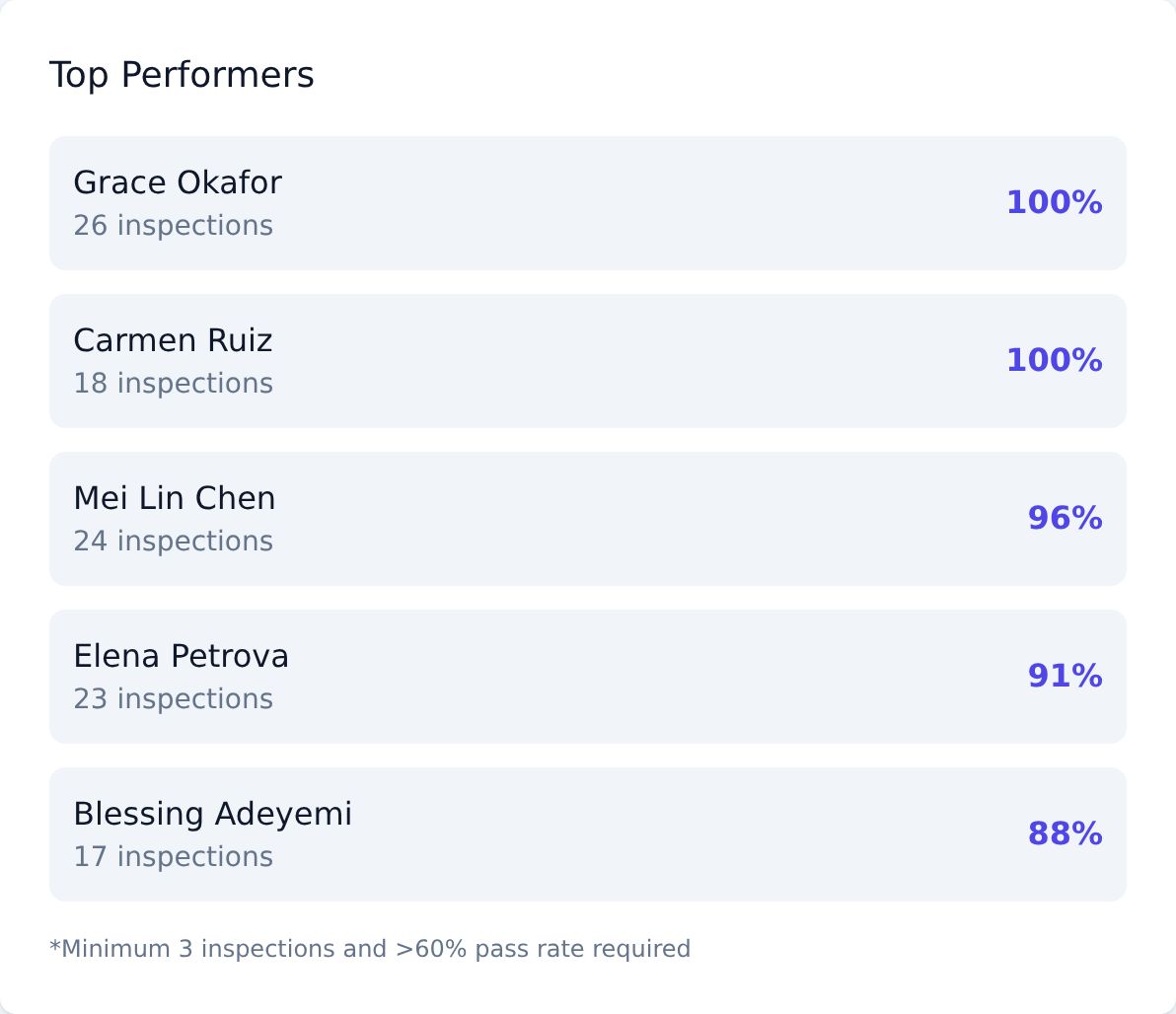
Coach from the record
Pass rates by attendant and by area of the room, so each conversation is about what that person actually missed.
How you would know
Captured on the floor, kept where you can show it.
Digital Room Inspections
Comprehensive inspection system with mobile-optimized interface, pass/fail tracking, and detailed area-specific quality control.
- ✓ Mobile inspection builder
- ✓ Real-time status tracking
- ✓ Historical inspection data
- ✓ Custom inspection areas
Assignments and Handover
Turn a failed finding into a re-clean or a work order from the inspection, and give it to a named person, with or without a login. The supervisor records what they report over the radio, and the next shift sees the latest update before picking the job up.
- ✓ Assign staff who have no login
- ✓ Latest staff updates and DND warnings where relevant
- ✓ "Reported finished" kept apart from "verified"
- ✓ A printed list for the floor
Maintenance and Work Orders
Each room's preventive maintenance is worked out from its last service and your interval, so the overdue list is always current. Plan a slice of it to a date and an owner, and track work orders by priority.
- ✓ Overdue PM worked out per room
- ✓ Work order tracking
- ✓ Maintenance history
- ✓ Priority management
Staff Performance Analytics
Pass rates by attendant, and by area within the room. When one attendant's beds keep failing and another's bathrooms do, the coaching writes itself.
- ✓ Pass rates by attendant
- ✓ Scores by area within the room
- ✓ Failure patterns over time
- ✓ Coaching notes
Roles and access
Supervisors and managers sign in, each seeing what their role needs. Attendants and technicians go on the team roster and can be assigned work, and credited for it, without an account. Someone over several hotels signs in once and switches between them.
- ✓ Seven built-in roles
- ✓ One login across properties, a role at each
- ✓ A portfolio page comparing your properties
- ✓ A team roster that needs no logins
- ✓ Unlimited accounts on every plan
- ✓ Every query scoped to your property
Morning Brief
An email at 6 AM, property time, to managers and supervisors: work orders past target, rooms overdue for PM, rooms never inspected, and yesterday’s inspections. On a morning with nothing to act on, it does not send.
- ✓ Sent in the property’s own time zone
- ✓ Silent when there is nothing to act on
- ✓ Managers and supervisors, not attendants
- ✓ About the property each person manages
Also included
Housekeeping Daily Ops
DND room management, strenuous room tracking, and daily operations dashboard
Front Desk Operations
Room information access, work order visibility, and guest-facing tools
Comprehensive Reporting
PDF report generation, custom analytics, and performance summaries
Revenue and Forecasting
Daily revenue, occupancy forecasts, and a staffing calculator that states its standards
What day one looks like
No import project and no training day. The record starts with the first inspection you run.
1. Add your rooms
One at a time, or upload the whole property at once.
2. Inspect one from your phone
Photos, pass or fail by area. It works in a corridor with no signal and uploads when you are back in range.
3. The record starts
From the first one: what passed, what did not, and whose work it was.
What it costs
No contract, month to month. One price for the whole property — no per-user fees, no setup fee, no sales call.
From $59/month, by property size
One price for the whole property, with unlimited staff accounts on every plan — housekeeping, maintenance and front desk all get logins at no extra cost. The first 5 hotels start with 30 days free (14 after that); no card needed until you decide.
See pricingPrefer a guided start? Try a one-month pilot.
Guides for hotel operations teams
Written to be useful whether or not you ever use our software.
Answering a guest cleanliness complaint with the record, not from memory
When a cleanliness complaint or a brand escalation lands, the first instinct is to ask around. Asking around produces memory, and memory is what a guest, a brand or an owner discounts first. Pull the room's record before you reply — and if there is no record to pull, that is the finding.
Documenting a housekeeper’s performance before you coach
A coaching conversation built on memory turns into an argument about whether it really happened. Built on a dated record of specific rooms and areas, it becomes a conversation about what to change. The record is the fair part, for the attendant as much as for you.
Housekeeping labor cost per occupied room: how to calculate it and read it
Cost per occupied room is a ratio where both halves move. How to build it, why it rises on quiet days and heavy checkout days without anyone working slower, and what to read beside it.
Hotel linen par levels: how much linen to own
One par is the linen needed to make up every room once. How many pars to own depends on how long a set takes to come back from the laundry — three is a common starting point with an in-house laundry, four with an outsourced one — and the level only holds if somebody counts it.
The hotel room inspection checklist
The free PDF hotel room inspection checklist covers entry, closet, bed, electronics and bathroom in walking order. Score guest-visible failures consistently before releasing the room.
Building a hotel preventive maintenance schedule
Hotel room PM means preventive maintenance: inspect HVAC, outlets, plumbing and fixtures on a set cycle. For 200 rooms, a quarterly rotation takes about 3 rooms per working day.
Common questions
We already have a PMS. What does this do that it does not?
A PMS records room status -- clean, dirty, inspected -- which is an assertion by whoever cleaned it. It does not record whether anyone verified the work, who did it, or what they found. Guest-request tools cover what a guest reports, which is after it has already cost you. This is the record of what your own team found before that: which rooms were checked, by whom, what failed, and what is still outstanding.
Does it connect to my PMS?
No. StayTidy does not connect to any PMS, and nothing is synced either way -- your PMS stays the source of truth for reservations and room status. Rooms are entered once at setup, in ranges, so a 200-room property is a few lines. Inspections, work orders and maintenance live only in StayTidy, so there is nothing to keep in step. The one recurring entry is the daily occupancy, arrivals and departures forecast, typed from your PMS report, which the staffing calculator uses -- and you can skip it if you do not use that page.
What does it actually tell me about my housekeeping team?
Pass rates by attendant, and scores by area within the room. So when one attendant keeps failing on beds and another on bathrooms, those are two different coaching conversations -- with the record to back either.
What happens when a room fails inspection?
Nothing is raised on its own. The inspection records which areas failed, with notes and photos, and whether each was a cleaning miss or a maintenance fault; a maintenance fault is kept out of the attendant's pass rate. From the inspection, a failed room becomes a re-clean, or a failed area a work order, in a couple of taps, given to a named person. A re-clean is verified by a passing reinspection, and a work order reported finished waits until someone other than the worker verifies it.
What happens to unfinished work at a shift change?
It stays on the Assignments list with its owner, its target date and the latest update the supervisor recorded, so the next shift can see why it stopped and what comes next without calling anyone. A job a worker reports finished waits under "reported finished" until someone other than that worker verifies it, or returns it with a reason.
We run several hotels. Does it handle that?
Yes. One login can cover several properties, with a switcher to move between them and a role at each, so a manager at one hotel can be a viewer at another. A portfolio page compares the properties you belong to on pass rate, rooms overdue for PM, rooms never inspected and work orders past target, showing only those where your role lets you see performance figures. Billing is one subscription for the account, with each property at its own room-count band. An admin can add another property from Settings.
How much does StayTidy GM cost?
Plans are priced by property size and billed monthly: Starter $59/month (up to 75 rooms), Standard $129/month (up to 200 rooms), Large $249/month (up to 500 rooms), Enterprise by arrangement (501+ rooms). Every plan includes every feature and unlimited staff accounts.
Is there a free trial?
Yes. The first 5 hotels to sign up get 30 days and every hotel after that gets 14, with no card required to start. At the end of the trial the account becomes read-only until a plan is chosen: your data stays readable and exportable, and only new entries are blocked. Nothing is deleted.
Do you charge per user?
No. Pricing is per property, by room count, with unlimited accounts on every plan. In practice only supervisors and managers need one: attendants and technicians go on the team roster and can be assigned work, and credited for it, without a login. The supervisor records what they report.
Does it work offline?
Yes. Inspections captured without a connection are stored on the device and upload automatically when signal returns, photos included. Hotel wifi is unreliable in stairwells and back corridors, which is where inspections happen.
Can I cancel any time?
Yes, from your billing settings, in about two clicks. There is no contract and no minimum term -- cancellation takes effect at the end of the period already paid for, and your data remains readable and exportable afterwards.
Do we need to install anything?
No. It runs in a browser on a phone, tablet or desktop, and can be added to a phone home screen like an app. There is nothing to install on the property and no server to run.
Stop guessing about the floor below you
Set up your property and run your first inspection today. The first 5 hotels get 30 days free, no card required, and nothing to install.